
GEICO Mobile - Car Insurance
GEICO InsuranceFinance
4.4138.88K Reviews
- Version
- 5.112.1
- Installs
- 10.00M
- Age Rating
- Everyone
Screenshots
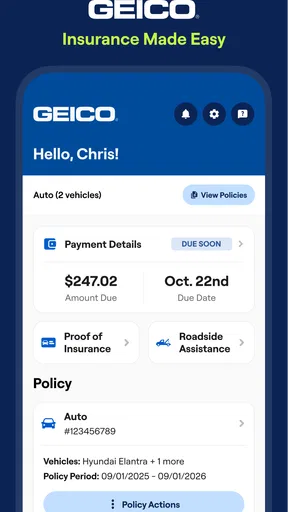
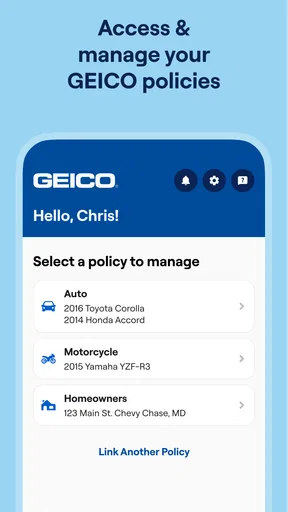
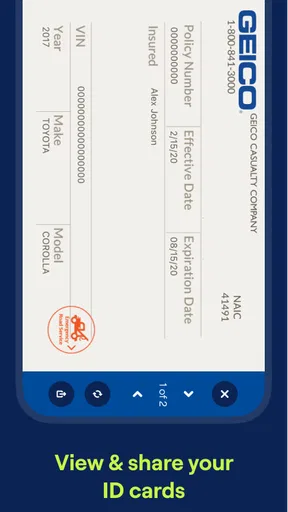
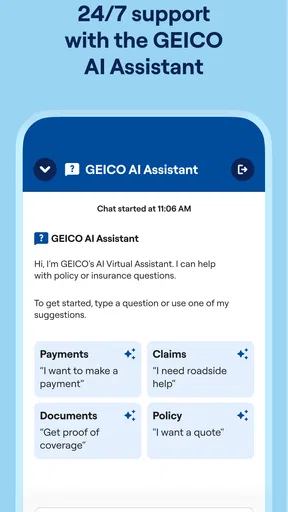
Our Review of GEICO Mobile - Car Insurance
 Analysis by Appyee
I found GEICO Mobile most useful when I stopped thinking of it as a general finance app and treated it as a practical companion for managing GEICO car insurance. In a household where more than one person drives the same vehicle, that distinction matters. The app can make routine insurance tasks easier to handle from a phone, but it does not replace good communication between drivers or careful attention to who is actually responsible for a policy.
Developed by GEICO Insurance, this free finance app is aimed at people who already use GEICO for their car insurance or are considering whether a mobile account would make everyday management more convenient. Its store summary, “Car Insurance Made For You,” is brief, but the real appeal is less about browsing financial information and more about having insurance-related access available when you are away from a computer.
I also think its large audience says something about the basic idea: GEICO Mobile has passed the ten-million-install mark, with an average rating of 4.5 from roughly half a million ratings. Those figures do not guarantee that every household will have the same experience, but they suggest that the app is established rather than experimental. It is rated for Everyone, costs nothing to install, and the current version is 5.108.1.
Using GEICO Mobile in a shared household
When several people share a car, I find it helps to agree on who keeps the GEICO account and who simply needs insurance information before anyone needs it in a hurry. I’d make that distinction part of the household’s routine, then show each driver how to ask the policyholder for the right details. That keeps shared access practical while protecting personal account information.
One car, several drivers, and the value of a common point of reference
The most convincing use case is a household that shares a car, a policy, or both. Imagine one person taking the vehicle to work, another using it for school or errands, and a third person handling the insurance paperwork. In that situation, the app can give the policyholder a more direct way to deal with insurance tasks without waiting for the person who keeps the paper documents or uses the family computer.
That convenience is especially useful before a trip. I would rather check the relevant insurance information from the phone than search through an email inbox or a drawer for old paperwork. If a driver needs to confirm details while away from home, having a mobile route to the account can reduce unnecessary back-and-forth. The important point is that access helps with coordination; it does not automatically make every driver an account manager.
For a shared device, I would be deliberate about who uses the app. A family tablet or an older phone may be convenient, but insurance accounts contain personal and financial information. I would not leave the account open for every household member simply because the device sits in a common room. A better routine is to use the app when needed, finish the task, and sign out or otherwise secure the device according to the phone’s own account and privacy settings.
This is one of the less obvious trade-offs. A mobile app can make information easier to reach, but easier access also means more responsibility. If several people use one phone, the convenience of a saved session may not be worth the risk of exposing policy details to the wrong person. GEICO Mobile works best when the household agrees on who owns the account and who is only using the information for a specific driving need.
Setting boundaries before handing over the phone
I would separate three roles in a household: the person responsible for the policy, the person who drives the insured vehicle, and the person who may need to see proof or basic information. These roles can belong to one person, but they do not have to. Treating them as separate makes the app easier to use safely.
For example, a teenager may need insurance information during a family trip, while a parent remains responsible for account decisions. An adult roommate may drive the car occasionally but should not automatically receive unrestricted access to the policyholder’s account. GEICO Mobile can be part of the arrangement, but the app should not be treated as a substitute for deciding what each person is allowed to handle.
My practical approach would be to keep the main account on the policyholder’s personal phone, then provide only the necessary information to another driver when a situation calls for it. That may mean showing a document, explaining where to find a detail, or handling the task together. It is slightly less convenient than sharing everything, but it creates a clearer boundary between driving access and financial access.
This matters even more on a device used by children or guests. The Everyone age rating makes the app broadly suitable from a content perspective, but that does not mean every user should have the same account privileges. Age suitability and account authority are different questions. A younger driver may be perfectly capable of using insurance information responsibly while still not being the person who should change or manage policy details.
Coordinating after a minor incident or urgent question
Insurance apps become most valuable when people are under pressure. After a minor collision, a driver may need to locate insurance information quickly, contact the right party, or understand what to do next. In that moment, a phone-based account is more practical than relying on memory. I would still avoid making the app the only preparation: every driver should know whose policy covers the vehicle and how to reach the policyholder.
A useful household exercise is to open the app together before anyone takes a long trip. The account holder can show the regular driver where important information is located and explain which actions should be handled by the policyholder. This turns the app from a private tool into part of a simple family procedure without giving everyone the same level of access.
There is also a communication benefit. If one person handles insurance and another person drives, the driver can report what happened while the account holder works through the account. That division can prevent two people from making conflicting decisions. It also avoids a common mistake: assuming that the person holding the phone automatically understands the policy.
I would not rely on a single screenshot or an old saved document as the household’s permanent solution. Insurance information can change, and a screenshot may be outdated when it is finally needed. Checking the current account when preparing for a trip is a better habit. The app is most useful when it supports that habit rather than encouraging people to collect information once and forget about it.
Trust, age, and personal responsibility
Because GEICO Mobile belongs to the finance category, trust is central to the experience. I am comfortable recommending it to an adult policyholder who wants a direct mobile connection to GEICO, but I would explain the account boundaries before recommending it to a shared household. The app itself may be simple to open; the decisions around access are not.
Parents may find it helpful for teaching a new driver what insurance information looks like and why it matters. That is different from letting the new driver manage the whole account. A supervised walkthrough can teach practical confidence: how to identify the insured vehicle, where to look for relevant documents, and when to call the policyholder instead of guessing.
For older relatives, the app can be useful if they are comfortable with phone-based services, but convenience should not be assumed. A person who prefers paper documents or phone support may find a mobile account less reassuring, especially during a stressful event. In that case, I would use GEICO Mobile as an additional option rather than forcing it to become the only way the household handles insurance.
Shared-device use also raises a quieter issue: notifications and account visibility. Even without inventing special family controls, it is sensible to consider who can see alerts on a lock screen and who can open the phone. I would review the device’s general privacy settings and avoid assuming that an app designed for personal account access is automatically suitable for an open household tablet.
Where it fits beside traditional alternatives
The usual alternative is a web browser, a phone call, or physical insurance documents. GEICO Mobile is more convenient than paper when the driver is away from home, and it can feel more focused than navigating a general website on a small screen. For routine account access, that focus is its strongest argument.
A browser may still be better for someone who rarely uses the app, works from a desktop, or wants to compare information across several tabs. Calling GEICO can be preferable when the situation is complicated, when a driver is unsure what a policy detail means, or when a household needs an explanation rather than a document. Paper remains useful as a backup for people who do not want to depend on a charged phone or an internet connection.
That comparison helped me place the app correctly. It is not a replacement for every insurance interaction. It is a mobile layer around the relationship with GEICO. If you already prefer handling everything by phone with a representative, the app may add little. If you regularly need quick access while traveling or coordinating a shared vehicle, it can remove small but irritating obstacles.
Small habits that make the app more useful
My first tip is to explore the account when nothing is wrong. Stress makes unfamiliar menus feel harder, so a quiet check before a trip is worthwhile. I would identify the information I might need, confirm that I can access the account, and make sure the policyholder knows how another driver should ask for help.
My second tip is to avoid confusing visibility with authority. Showing a driver where information is located does not mean that person should make account changes. Keep the policyholder involved in decisions that affect coverage, vehicles, or personal details. This is particularly important when several adults share a car but maintain separate finances.
My third tip is to use the app as part of a two-channel plan. Keep the relevant contact information and basic vehicle details available through the normal household process, while using GEICO Mobile for current account access. That way, a dead battery, lost phone, or poor connection does not leave the driver completely unprepared.
My fourth tip is to update the household’s understanding whenever the vehicle situation changes. A new driver, a different car, or a change in who handles the policy can make old assumptions unsafe. The app can provide access, but only a conversation can establish who is responsible for what.
Who should choose it, and who may want something else
I would recommend GEICO Mobile first to existing GEICO customers who want insurance information close at hand and who are comfortable managing a personal account from a phone. It is also a sensible choice for households that share vehicles but can maintain a clear distinction between the policyholder and other drivers.
I would be more cautious about recommending it as the main solution for a household that shares one unlocked device, has several people using the same account, or expects the app to explain complex insurance decisions. In those situations, the convenience can create confusion. A direct conversation with GEICO, supported by carefully managed documents, may be better.
It may also be the wrong fit for someone who does not have reliable access to a compatible phone. The minimum operating system is iOS or Android version 9, which gives the app a broad technical reach, but an older compatible device can still be inconvenient if it is slow, shared, or rarely connected. Free installation does not remove those practical requirements.
Another limitation is psychological rather than technical: some people simply do not want financial and insurance information concentrated on a mobile device. I understand that preference. For them, the app should be optional convenience, not a requirement. A good insurance workflow should still make sense when a person chooses to use a browser, speak with GEICO, or keep backup documents available.
My household verdict
After looking at it through a shared-use lens, I see GEICO Mobile as a useful tool with a narrow but meaningful job. It can make GEICO car insurance easier to reach during ordinary errands, travel, and unexpected driving situations. Its value increases when one household has several drivers and one person needs to coordinate the policy.
The best experience comes from pairing the app with sensible boundaries. Keep the main account with the policyholder, teach other drivers where to find necessary information, and do not confuse a broad Everyone rating with permission for every age group to manage private account details. Those simple rules preserve the convenience without turning a shared phone into an open account.
GEICO Mobile is free, widely used, and maintained by GEICO Insurance, which makes it an easy app to try if you already have a GEICO policy. I would not install it expecting a universal replacement for customer service or a complete household management system. I would install it for quick mobile access, then decide how it fits into the family’s existing insurance routine.
My final recommendation is positive but practical: choose it if your main goal is to keep GEICO insurance information available while you are on the move. Skip it, or treat it as secondary, if your household needs extensive explanation, prefers desktop or paper workflows, or cannot agree on account responsibility. The app is most valuable when it improves access without weakening accountability.
Privacy and Permissions
See what permissions an app requests and how it handles your data.
- Contacts
- read your contacts
- Location
- approximate location (network-based), precise location (GPS and network-based)
- Phone
- read phone status and identity
- Photos/Media/Files
- read the contents of your USB storage, modify or delete the contents of your USB storage
- Storage
- read the contents of your USB storage, modify or delete the contents of your USB storage
- Camera
- take pictures and videos
- Microphone
- record audio
- Wi-Fi connection information
- view Wi-Fi connections
- Device ID & call information
- read phone status and identity
- Other
- view network connections, pair with Bluetooth devices, access Bluetooth settings, full network access, change your audio settings, run at startup, reorder running apps, use accounts on the device, control vibration, prevent device from sleeping, read Google service configuration
Verdict
Strengths of GEICO Mobile - Car Insurance
- Quick access to digital insurance cards and policy details
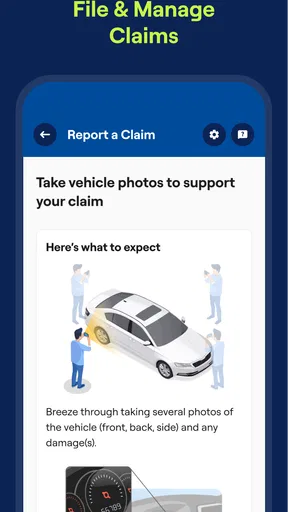
- Easy claims filing with photo and document uploads
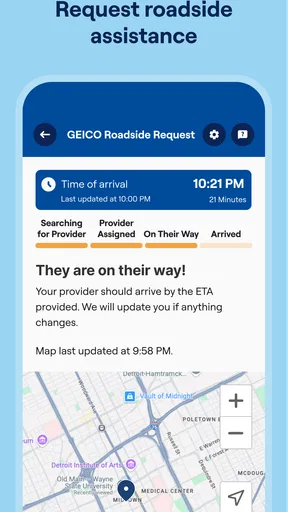
- Roadside assistance can be requested directly in the app
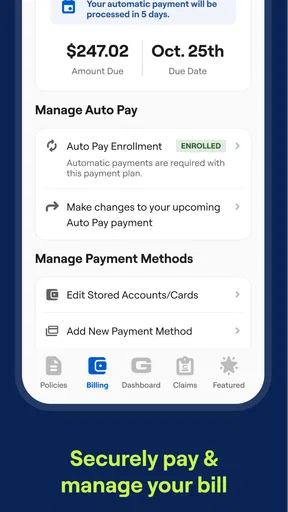
- Payment management and billing reminders are conveniently available
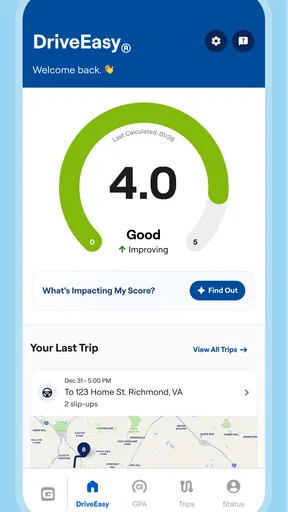
- Vehicle maintenance tools help track service needs and recalls
Limitations of GEICO Mobile - Car Insurance
- Some features may require an active GEICO policy and account login
- App performance and feature availability can vary by device
- Quote and policy changes may still require contacting an agent
- Location and camera permissions may be needed for certain tools
- Not all roadside or repair services may be available in every area
Similar Picks in This Category
View All
Google Wallet
Google LLC4.3

Airtel: Recharge, Bank & Loans
Airtel4.0

PayPal - Pay, Send, Save
PayPal Mobile4.2

DANA Indonesia Digital Wallet
PT Espay Debit Indonesia Koe4.5

Binance: Buy Bitcoin & Crypto
Binance Inc.4.8

Cash App
Block, Inc.4.7
Frequently Asked Questions
What can I do with the GEICO Mobile app?
GEICO Mobile lets policyholders manage many everyday insurance tasks from an Android or iOS device. After signing in, you can view policy details, access digital ID cards, make payments, review billing information, request roadside assistance, and contact GEICO. Depending on your policy and location, the app may also support claims reporting, claim-status updates, photo uploads, vehicle information, and other account services.
Can I use GEICO Mobile to file and manage a car insurance claim?
Yes, the app is designed to make the claims process more convenient. You can generally report an accident or other covered event, provide incident details, upload photographs, review claim information, and communicate with GEICO during the process. The exact options may vary by claim type, state, and policy. Filing through the app does not guarantee coverage, and a claims representative may still need additional information.
Does GEICO Mobile provide digital proof of insurance?
GEICO Mobile can provide access to digital insurance ID cards, which is useful when you need to show proof of coverage during a traffic stop, vehicle registration process, or other situation. Availability and acceptance of electronic proof can depend on local laws and the organization requesting it. It is still sensible to keep a paper copy in your vehicle, especially when traveling or in areas with limited phone access.
Can I make payments and manage my policy through the app?
The app allows eligible users to review billing information and make insurance payments without visiting the GEICO website. You may also be able to view policy documents, update selected account details, and check upcoming payment information. However, not every policy change can be completed inside the app. Some requests may require contacting GEICO directly, and payment options or processing times can differ depending on your account.
Is GEICO Mobile safe to use, and what do I need to access my account?
GEICO Mobile is intended for secure access to your GEICO account, but you should download it only from the official Google Play Store or Apple App Store and keep your device updated. You will typically need your GEICO login credentials, and some features may require identity verification or device permissions. Avoid sharing passwords, use a secure connection, and sign out or protect the app if other people can access your phone.
